

MyChart Addition: 3 More Languages Available
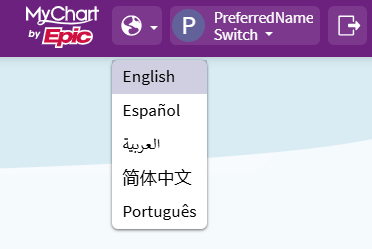
We’re excited to share that with the November 9 Epic upgrade, we now have three new languages available to our patients in MyChart. Patients can now change the language settings in MyChart to translate parts of the site into Arabic, Simplified Chinese, and Brazilian-Portuguese. Spanish translation was already offered previously.
Switching languages in MyChart is easy. Patients just need to click on the world icon in the purple menu on the top of the screen and select their preferred language. In the mobile app, they can go to “Account Settings” and then click the world image (“Change Language").
Not all sections of MyChart are able to be translated. Messages with providers and the patient’s care team will not be translated. You can use current translation services options to help communicate with patients whose preferred language is not English.
Please share this information with our patients! You can find more information here.